


 Imagine you’ve split up this chunk of work so that, collectively, it finishes much faster. When all of the threads are done, you want to kick off the next round of work. For example, if the threads are writing data to flat files, when they’re all done, you might want to then kick off a process that zips them, or moves them, or bulk loads them into a different system, or all of the above.
When you have a single job that depends on the completion of a single previous job, it is quite easy to chain them. The last step of the first job simply calls
Imagine you’ve split up this chunk of work so that, collectively, it finishes much faster. When all of the threads are done, you want to kick off the next round of work. For example, if the threads are writing data to flat files, when they’re all done, you might want to then kick off a process that zips them, or moves them, or bulk loads them into a different system, or all of the above.
When you have a single job that depends on the completion of a single previous job, it is quite easy to chain them. The last step of the first job simply calls sp_start_job for the subsequent job (or they’re simply steps in a single job).
When you have one of more jobs that depend on the completion of multiple previous jobs, it can be a little harder to synchronize everything. Many people accomplish this by looking at past runtimes and scheduling in a buffer. For example, if the jobs typically take two hours to complete, they’ll schedule the next job(s) to start three hours after the start of the first set.
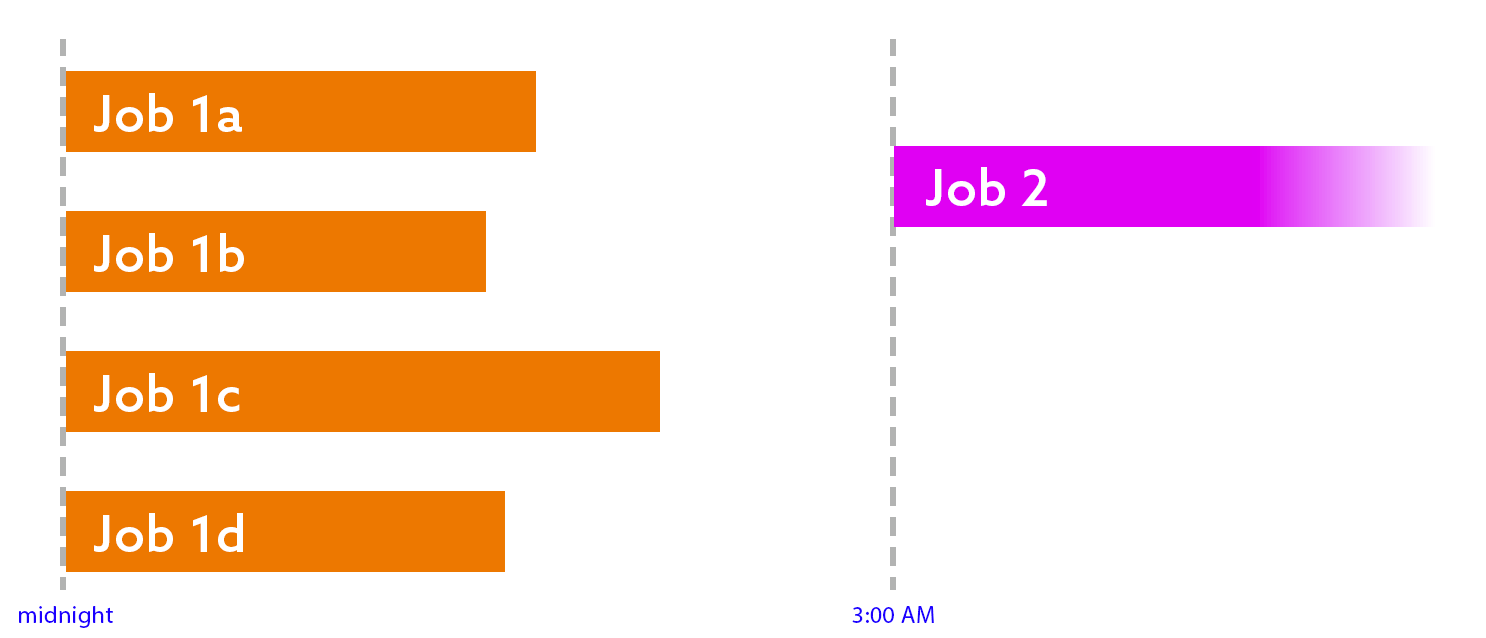 You might notice that this introduces two problems:
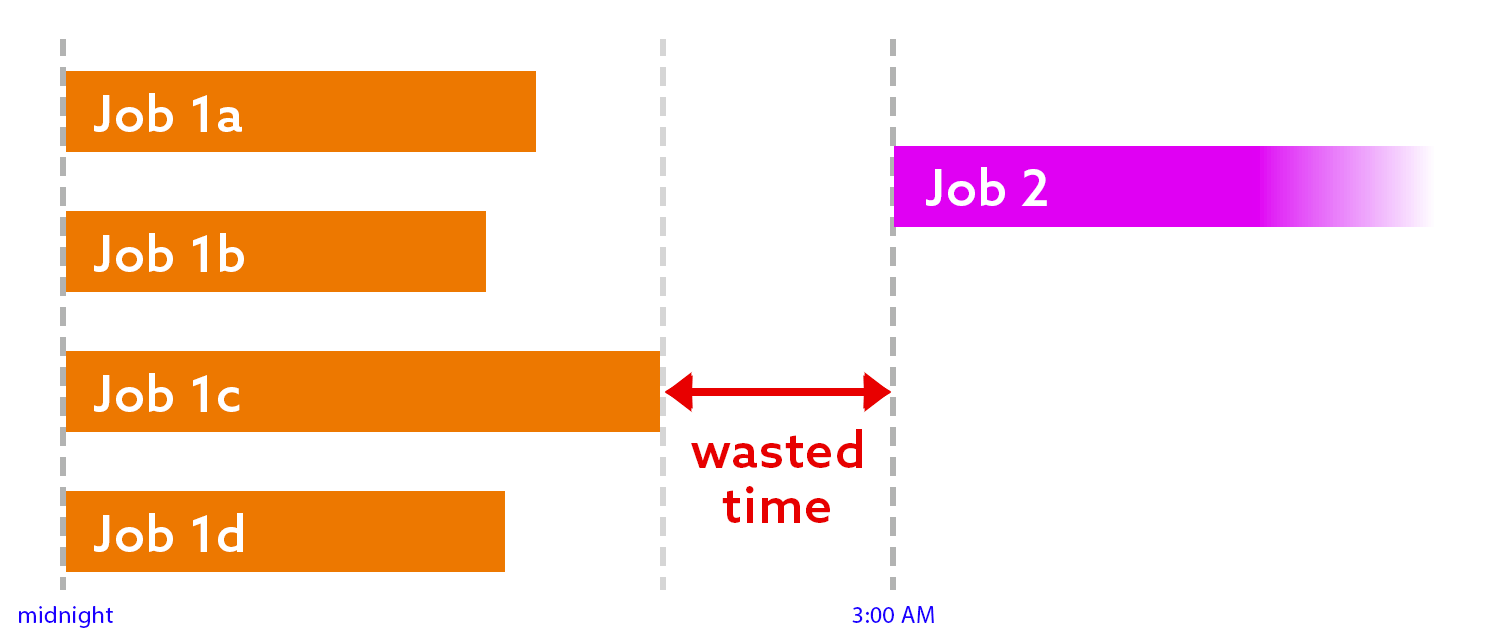
- Wasted time. If the last job in the first round finishes at the expected time (or earlier), then there is at least an hour of idle time:
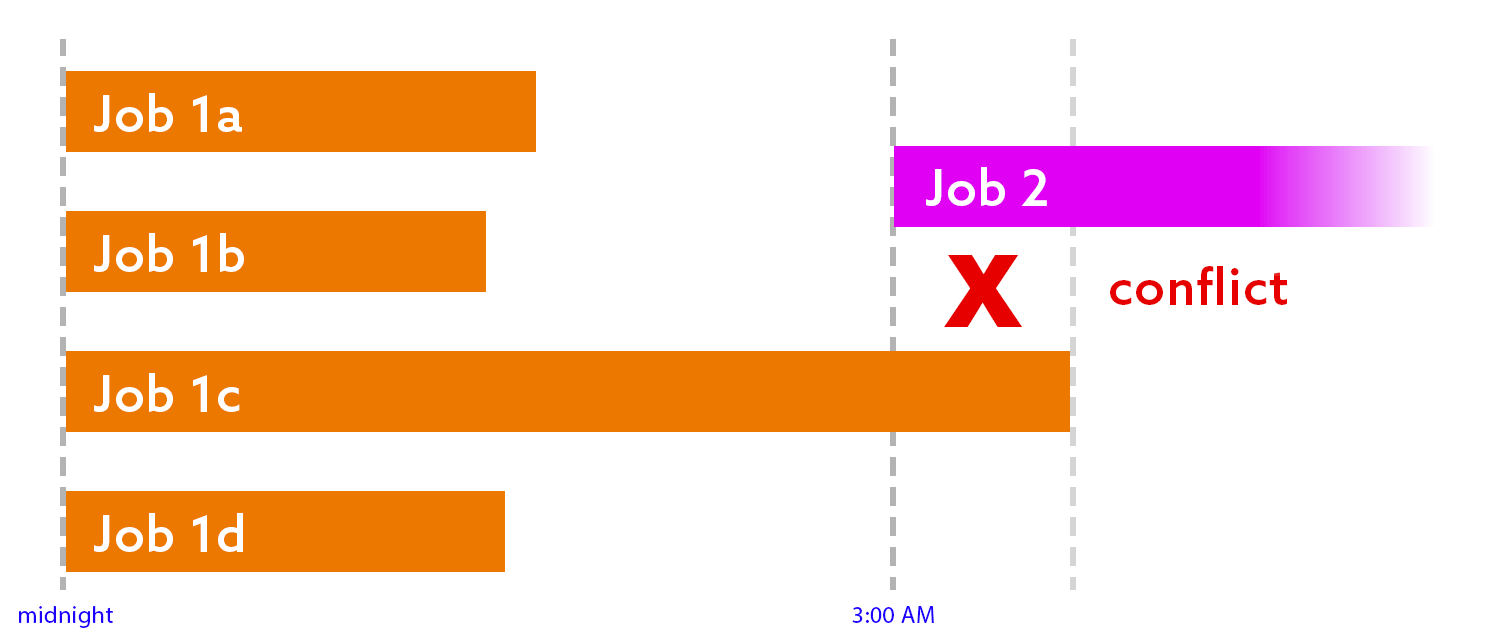
- Conflict. If any job in the first round runs longer than expected, the next job(s) will start too early:
A localized solution
I’m not going to pretend to have a magic, comprehensive answer for a complex job management solution, but I can show you exactly how I solved this problem for my scenario. My goal was simple: to ensure the next round of work starts right when it should – no sooner, no later.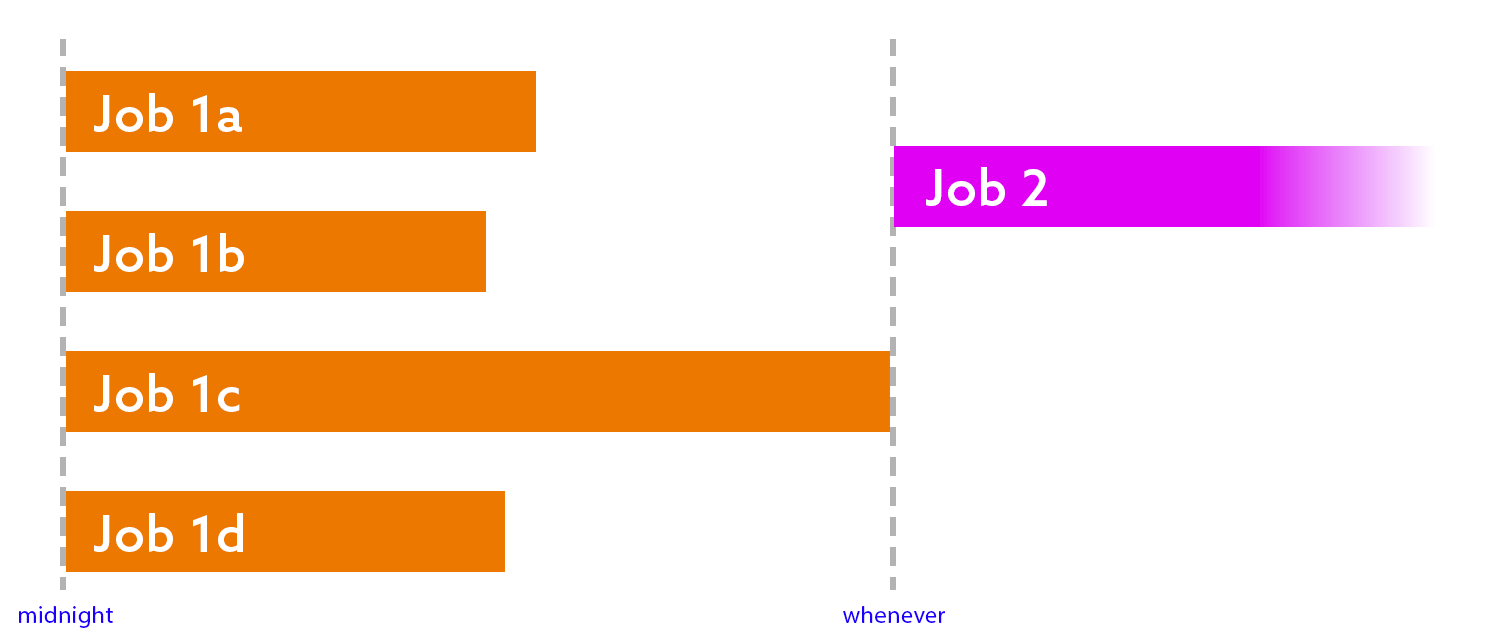 The first thought I had was this: why not just have job 2 check if all the jobs in the first round have finished (successfully, of course)? The problem with that is, if the answer is no, then what? Sleep for 10 seconds and try again? This is not a great solution – even if it uses no resources to loop over and over again until the answer is yes, it looks to DBAs and monitoring tools like the job is running, while at least one of the previous jobs is also running. It also skews metrics involving job runtimes, if you use that information for anything (I do).
A more logical approach is this: have each job in the first round check, as their last step, if the other jobs in the first round have also finished. If the answer is no, quit with success. If the answer is yes, run
The first thought I had was this: why not just have job 2 check if all the jobs in the first round have finished (successfully, of course)? The problem with that is, if the answer is no, then what? Sleep for 10 seconds and try again? This is not a great solution – even if it uses no resources to loop over and over again until the answer is yes, it looks to DBAs and monitoring tools like the job is running, while at least one of the previous jobs is also running. It also skews metrics involving job runtimes, if you use that information for anything (I do).
A more logical approach is this: have each job in the first round check, as their last step, if the other jobs in the first round have also finished. If the answer is no, quit with success. If the answer is yes, run sp_start_job, and quit with success. This way, the second job won’t start until the last job in the first round has finished.
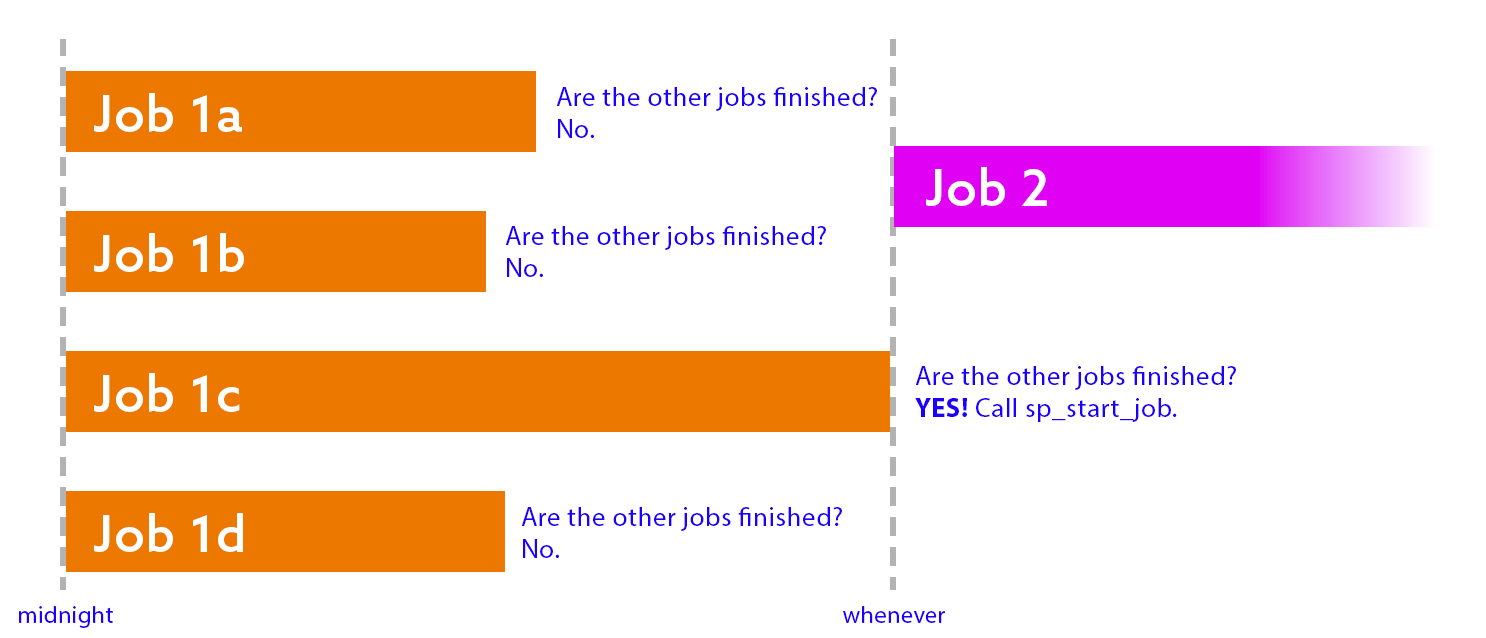 Before I share the code to handle this, there are some caveats here. We need to:
- …check for success, not just completion. If one of the other jobs failed, we probably want to raise an alarm.
- …check that the successful job started and finished within a reasonable time. If it completed yesterday or last week, or ran for five days, we probably want to sound an alarm.
- …handle ties. If the last two jobs finish at the exact same time, they might both try to start the second round job, but only one will win. We need to fail gracefully and not sound an alarm in this case.
- …wait and verify that the second job was successfully started, and that it wasn’t already running before we got to this step.
- …have SQL Server Agent tokens enabled. This isn’t critical, but I use those to identify the current job dynamically, without having to hard-code different names in each job.
GETDATE(), but this can get complicated if your server also observes Daylight Saving Time.
|
1 2 3 4 5 6 7 8 9 10 11 12 13 14 15 |
DECLARE @ThreadCount int = 4, @JobStartThresholdMinutes int = 720, /* 12 hours */ @JobFinishThresholdMinutes int = 60, /* 1 hour */ @CurrentAgentSession int, @now datetime = GETUTCDATE(), @NextJobName nvarchar(128) = N'Job 2', @ThisJobName nvarchar(128) = N'$(ESCAPE_SQUOTE(JOBNAME))', @JobNamePattern nvarchar(128) = N'Job 1[a-d]'; DECLARE @start datetime = DATEADD(MINUTE, -@JobStartThresholdMinutes, @now), @end datetime = DATEADD(MINUTE, -@JobFinishThresholdMinutes, @now); SELECT @CurrentAgentSession = MAX([session_id]) FROM msdb.dbo.syssessions; |
|
1 2 3 4 5 6 7 8 9 10 11 12 13 14 15 16 17 18 |
DECLARE @jobs table ( job_id uniqueidentifier, [name] nvarchar(128) ); INSERT @jobs(job_id, name) SELECT job_id, name FROM msdb.dbo.sysjobs WHERE name LIKE @JobNamePattern AND name <> @ThisJobName; IF @@ROWCOUNT <> @ThreadCount - 1 BEGIN RAISERROR('Wrong number of jobs found.', 11, 1); END |
|
1 2 3 4 5 6 7 8 9 10 11 12 13 14 15 16 17 18 19 20 21 |
ELSE BEGIN DECLARE @RunningCount int; SELECT @RunningCount = COUNT(*) FROM @jobs AS j WHERE EXISTS ( SELECT 1 FROM msdb.dbo.sysjobactivity WHERE start_execution_date >= @start AND stop_execution_date IS NULL AND [session_id] = @CurrentAgentSession AND job_id = j.job_id ); IF @RunningCount > 0 BEGIN RAISERROR('%d job(s) still running.', 11, 1, @RunningCount); END |
|
1 2 3 4 5 6 7 8 9 10 11 12 13 14 15 16 17 18 19 20 21 22 23 24 25 26 27 |
ELSE BEGIN DECLARE @CompletedCount int; SELECT @CompletedCount = COUNT(*) FROM @jobs AS j INNER JOIN ( SELECT job_id, instance_id = MAX(instance_id) FROM msdb.dbo.sysjobhistory WHERE run_status = 1 AND step_id = 0 GROUP BY job_id ) AS h ON j.job_id = h.job_id INNER JOIN msdb.dbo.sysjobactivity AS ja ON j.job_id = ja.job_id AND ja.job_history_id = h.instance_id WHERE ja.start_execution_date >= @start AND ja.stop_execution_date >= @end; IF @CompletedCount <> @ThreadCount - 1 BEGIN RAISERROR('Only %d job(s) completed.', 11, 1, @CompletedCount); END |
|
1 2 3 4 5 6 7 8 9 10 11 12 13 14 15 16 17 18 19 20 21 22 23 24 |
ELSE BEGIN EXEC msdb.dbo.sp_start_job @job_name = @NextJobName; WAITFOR DELAY '00:00:10'; IF NOT EXISTS ( SELECT 1 FROM msdb.dbo.sysjobs AS j INNER JOIN msdb.dbo.sysjobactivity AS ja ON ja.job_id = j.job_id WHERE j.name = @NextJobName AND start_execution_date >= DATEADD(MINUTE, -5, @now) AND stop_execution_date IS NULL ) BEGIN RAISERROR('%s is not running!', 11, 1, @NextJobName); END END END END |
Appendix: The whole code block
|
1 2 3 4 5 6 7 8 9 10 11 12 13 14 15 16 17 18 19 20 21 22 23 24 25 26 27 28 29 30 31 32 33 34 35 36 37 38 39 40 41 42 43 44 45 46 47 48 49 50 51 52 53 54 55 56 57 58 59 60 61 62 63 64 65 66 67 68 69 70 71 72 73 74 75 76 77 78 79 80 81 82 83 84 85 86 87 88 89 90 91 92 93 94 95 96 97 98 |
DECLARE @ThreadCount int = 4, @JobStartThresholdMinutes int = 720, /* 12 hours */ @JobFinishThresholdMinutes int = 60, /* 1 hour */ @CurrentAgentSession int, @now datetime = GETUTCDATE(), @NextJobName nvarchar(128) = N'Job 2', @ThisJobName nvarchar(128) = N'$(ESCAPE_SQUOTE(JOBNAME))', @JobNamePattern nvarchar(128) = N'Job 1[a-d]'; DECLARE @start datetime = DATEADD(MINUTE, -@JobStartThresholdMinutes, @now), @end datetime = DATEADD(MINUTE, -@JobFinishThresholdMinutes, @now); SELECT @CurrentAgentSession = MAX([session_id]) FROM msdb.dbo.syssessions; DECLARE @jobs table ( job_id uniqueidentifier, [name] nvarchar(128) ); INSERT @jobs(job_id, name) SELECT job_id, name FROM msdb.dbo.sysjobs WHERE name LIKE @JobNamePattern AND name <> @ThisJobName; IF @@ROWCOUNT <> @ThreadCount - 1 BEGIN RAISERROR('Wrong number of jobs found.', 11, 1); END ELSE BEGIN DECLARE @RunningCount int; SELECT @RunningCount = COUNT(*) FROM @jobs AS j WHERE EXISTS ( SELECT 1 FROM msdb.dbo.sysjobactivity WHERE start_execution_date >= @start AND stop_execution_date IS NULL AND [session_id] = @CurrentAgentSession AND job_id = j.job_id ); IF @RunningCount > 0 BEGIN RAISERROR('%d job(s) still running.', 11, 1, @RunningCount); END ELSE BEGIN DECLARE @CompletedCount int; SELECT @CompletedCount = COUNT(*) FROM @jobs AS j INNER JOIN ( SELECT job_id, instance_id = MAX(instance_id) FROM msdb.dbo.sysjobhistory WHERE run_status = 1 AND step_id = 0 GROUP BY job_id ) AS h ON j.job_id = h.job_id INNER JOIN msdb.dbo.sysjobactivity AS ja ON j.job_id = ja.job_id AND ja.job_history_id = h.instance_id WHERE ja.start_execution_date >= @start AND ja.stop_execution_date >= @end; IF @CompletedCount <> @ThreadCount - 1 BEGIN RAISERROR('Only %d job(s) completed.', 11, 1, @CompletedCount); END ELSE BEGIN EXEC msdb.dbo.sp_start_job @job_name = @NextJobName; WAITFOR DELAY '00:00:10'; IF NOT EXISTS ( SELECT 1 FROM msdb.dbo.sysjobs AS j INNER JOIN msdb.dbo.sysjobactivity AS ja ON ja.job_id = j.job_id WHERE j.name = @NextJobName AND start_execution_date >= DATEADD(MINUTE, -5, @now) AND stop_execution_date IS NULL ) BEGIN RAISERROR('%s is not running!', 11, 1, @NextJobName); END END END END |
FAQs
1. What is snake-draft sorting in SQL Server?
Snake-draft sorting (also called serpentine sorting) is a technique for assigning work units of unequal size to a fixed number of workers in a way that tends to balance total load. The rule: sort work units by size descending, then walk through them assigning to worker 1, 2, 3, … N, then reverse direction to N, N-1, … 2, 1, then reverse again, repeating. The name comes from fantasy-sports drafts where the pick order reverses each round. For SQL Server, this is useful when you have several SQL Agent jobs (or parallel threads) processing unevenly-sized databases, tables, or partitions – snake-draft assignment typically produces more even total-work-per-worker than round-robin or naive size-based partitioning.
2. Why does snake-draft sorting balance work better than round-robin?
Round-robin assigns work units in order without regard to size: worker 1 gets item 1, worker 2 gets item 2, etc. When items are sorted by size descending, round-robin gives the largest items to the first few workers consistently – they accumulate disproportionate total load. Snake-draft reverses direction each round so the first worker gets the largest item on round 1 but the last worker gets the largest remaining item on round 2. Over many rounds the alternation averages out, producing more balanced totals than round-robin. For workloads where item-size variance is high and the number of items is a moderate multiple of worker count, snake-draft typically beats round-robin substantially.
3. How do parallel SQL Agent jobs coordinate completion?
Three common patterns: (1) Polling a shared signalling table – each worker updates a ‘last heartbeat’ or ‘completed’ column; a coordinator job polls the table to detect when all workers report completion. Simple but requires polling overhead. (2) Using Service Broker or SQL Server Agent tokens with completion messages – each worker posts a completion event; a dedicated handler aggregates them. More complex but avoids polling. (3) Chaining SQL Agent jobs – the last-completing worker triggers a summary job via sp_start_job. Cleanest for simple batches but harder to know ‘who is last’ without coordination. This article shows the polling pattern for the snake-draft scenario.
4. How do I assign work to parallel SQL Agent jobs using snake-draft ordering?
Three-step pattern: (1) Collect work units with their estimated sizes into a staging table. (2) Compute the serpentine worker assignment – a common pattern is ROW_NUMBER() ORDER BY size DESC minus one, then if (worker_count*2 + row_num DIV worker_count) mod 2 = 0, assign to ((row_num – 1) mod worker_count) + 1; otherwise assign to worker_count – ((row_num – 1) mod worker_count). (3) Each SQL Agent job queries the staging table for its worker_id and processes its assigned units. For dynamic rebalancing during execution, re-run the assignment periodically or use a shared queue with ordered dequeue.
This document contains proprietary information and is protected by copyright law.
Copyright © 2026 Red Gate Software Limited. All rights reserved





Load comments